Verify a domain
An organization proves that it owns a domain, for example acme.com, by publishing a DNS TXT record. A verified domain is used for:
- the SSO connection: only the addresses of verified domains can use it;
- the transfer of an account to the organization.
Prerequisite: the Admin tier or higher.
1. Declare the domain
- Open Organization members, Domains tab.
- In the Verified domains card, click Add a domain.
- Domain:
acme.com, withouthttp://or@. - Click Add.
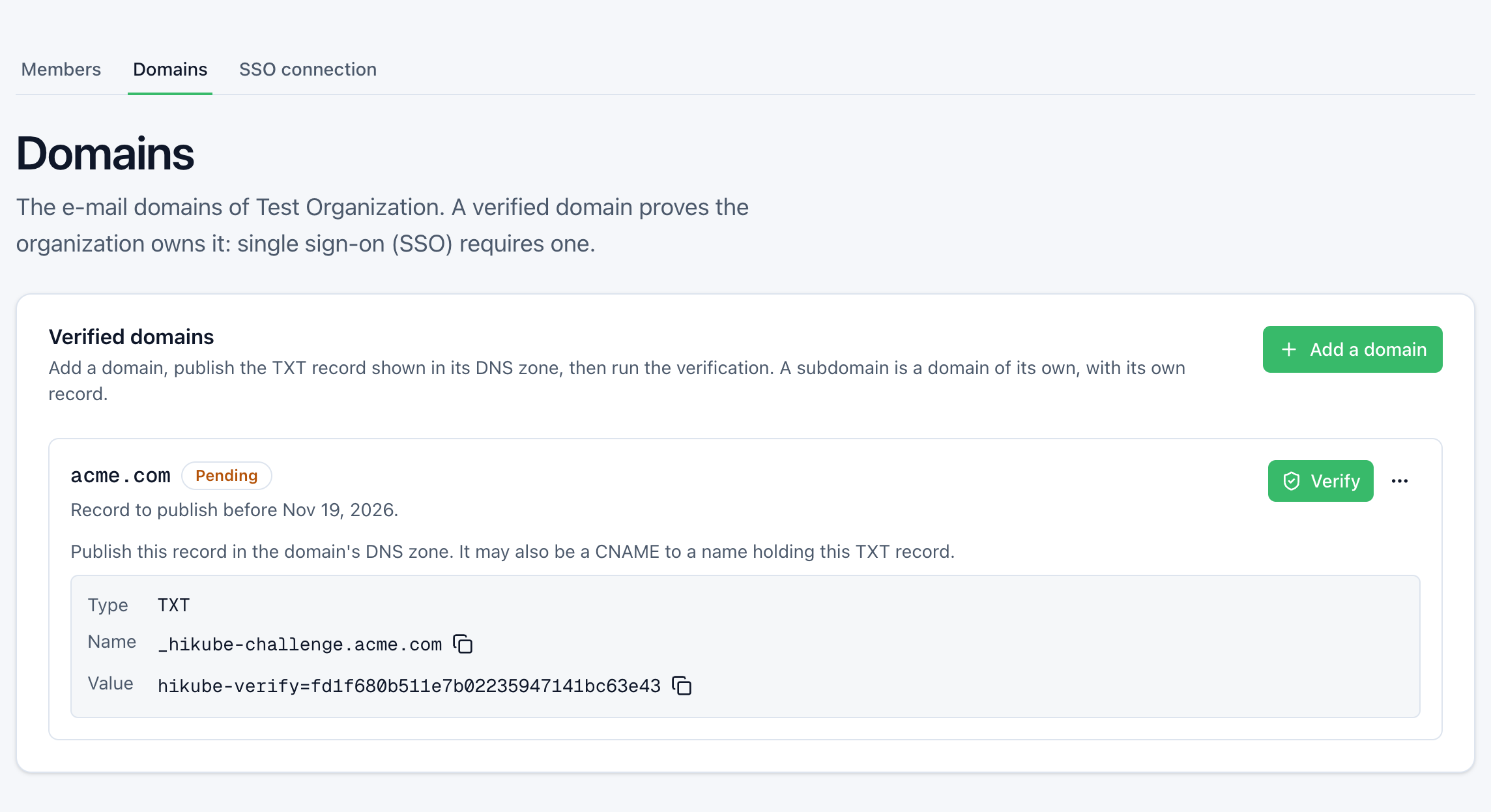
The console shows the record to publish:
| Type | Name | Value |
|---|---|---|
TXT | _hikube-challenge.acme.com | hikube-verify=<token> |
Each field has a copy button. The token is specific to your organization and to this domain. The domain is Pending.
2. Publish the record
Publish the TXT record in the DNS zone of acme.com within 7 days.
Check that it is visible from a public resolver:
dig +short TXT _hikube-challenge.acme.com @9.9.9.9
Expected result:
"hikube-verify=<token>"
After a "missing" answer, a resolver keeps that answer for the zone's negative TTL (the minimum of its SOA record): often a few minutes, sometimes up to an hour. Publish the record before running the verification.
3. Verify
Click Verify. The console shows acme.com is verified. and the status changes to Verified.
Statuses
| Status | Meaning | What to do |
|---|---|---|
| Pending | Record to publish before the date shown | Publish it, then Verify |
| Expired | Not verified within 7 days | Restart the verification: new token, new 7-day period |
| Verified | The organization owns the domain | Leave the record in place |
The Actions menu of a pending domain also offers Issue a new record. The old record then no longer counts: publish the new one before verifying.
Rules
- A subdomain is a domain of its own. Verifying
acme.comdoes not verifyeu.acme.com. Each subdomain has its own record. An addressbob@eu.acme.comdoes not belong to theacme.comdomain. - Refused domains. Public mail services (
gmail.com,outlook.com…) and public suffixes (co.uk,github.io…). A subdomain of a public suffix, such asacme.github.io, is accepted. - Length. 235 characters at most. A domain with accents is converted to its ASCII form:
bücher.chbecomesxn--bcher-kva.ch. - 20 domains at most per organization, whatever their status.
- One domain, one organization. If another organization has already verified the domain, the verification is refused.
Leave the record in place
The record must stay published as long as the organization keeps the domain. Hikube checks it again before each operation that gives the domain a new effect.
Operations that check the record again:
- enabling the SSO connection, for each domain it serves;
- adding a domain to the Allowed domains of the SSO connection;
- transferring an account to the organization.
Sending an invitation does not check it. A successful check is valid for one hour for the domain.
The console shows the last check under the domain: record found, record missing or the DNS did not answer.
If the record has disappeared
The operation is refused. Nothing else changes:
- the domain stays Verified;
- the accounts, their access and their sign-ins keep working.
Publish the record again with the same token, shown with the domain, then redo the operation. If the DNS did not answer, try again a little later.
Delegate the record through a CNAME
A CNAME on _hikube-challenge.acme.com is followed: you can publish the TXT in another zone. The value must match exactly.
A wildcard CNAME, for example *.acme.com CNAME saas.exemple.net, also covers _hikube-challenge.acme.com. Whoever controls the TXT records of saas.exemple.net can then answer the verification of acme.com. With a wildcard CNAME, publish the TXT explicitly on _hikube-challenge.acme.com: an explicit name takes precedence over the wildcard.
A domain verified by another organization
A domain only changes organization through Hidora support, for example after an acquisition or the sale of the domain. Support removes it from the organization that holds it, with the agreement of its super admin or on proof of ownership. Your organization then verifies it normally. The accounts the former organization already manages remain its own.
Remove a domain
- In the domain's Actions menu, click Remove.
- Confirm Remove.
The domain becomes free again for another organization. The accounts of this domain that belong to the organization remain its own.
A domain named in the Allowed domains of the SSO connection cannot be removed: first remove it from the connection. A connection that no longer serves any domain is disabled.