Concepts — Kubernetes
Architecture
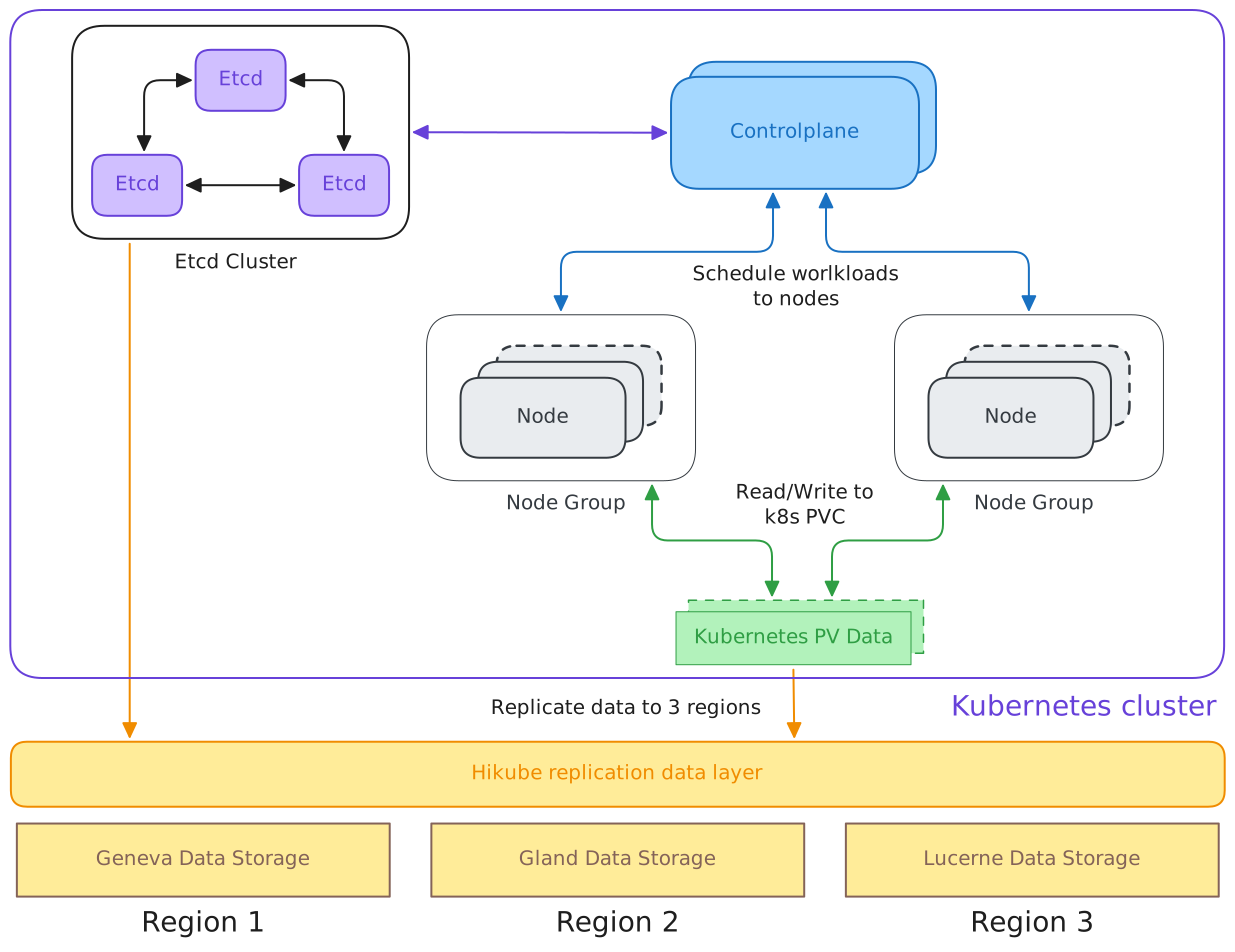
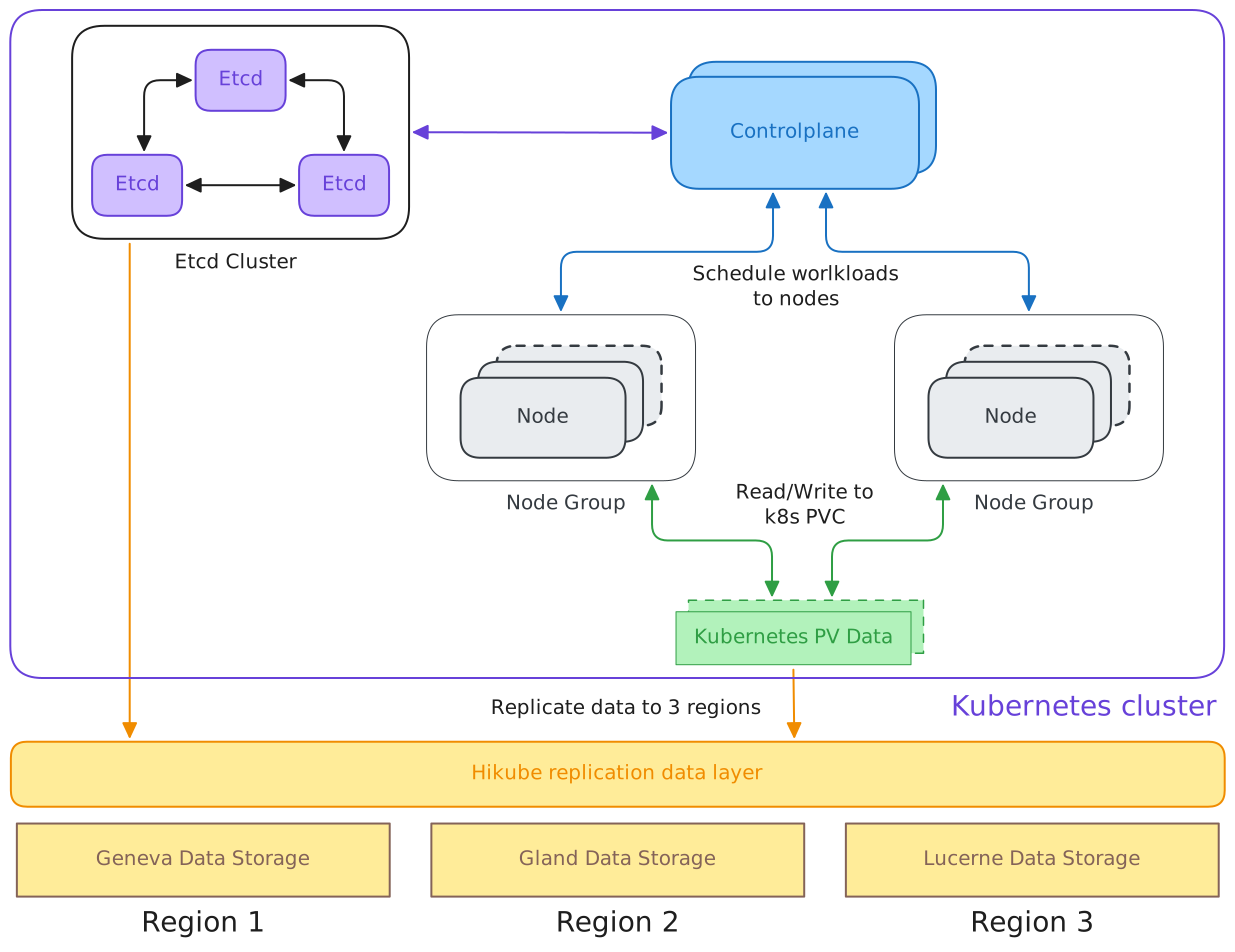
The diagram below illustrates the structure and main interactions of the Hikube Kubernetes cluster, including control plane high availability, node management, data persistence, and cross-region replication.
Main cluster components
Etcd Cluster
- Contains multiple etcd instances replicated among themselves.
- Ensures consistency of the Kubernetes cluster state storage (information about pods, services, configurations, etc.).
- Internal replication between
etcdnodes guarantees fault tolerance.
Control Plane
- Composed of the API Server, Scheduler, and Controller Manager.
- Role:
- Schedules workloads (pods, deployments, etc.) on available nodes.
- Interacts with etcd to read/write the cluster state.
Node Groups
- Each group contains multiple worker nodes.
- Workloads (pods) are deployed on these nodes.
- Nodes communicate with the Control Plane to receive their tasks.
- They read and write their data to Kubernetes Persistent Volumes (PV).
Kubernetes PV Data
- Represents the persistent storage used by pods.
- Workload data is written to and read from this storage.
- This layer is integrated with Hikube replication to ensure data availability.
Hikube replication layer
Hikube Replication Data Layer
- Serves as an interface between Kubernetes and the regional storage systems.
- Automatically replicates PV data to multiple regions for:
- high availability,
- regional failure resilience,
- and service continuity.
Regional storage
- Region 1 → Geneva Data Storage
- Region 2 → Gland Data Storage
- Region 3 → Lucerne Data Storage
Each region has its own storage backend, all synchronized through the Hikube layer.
Communication flow
- Etcd nodes synchronize with each other to maintain a consistent global state.
- The Control Plane reads/writes to etcd to store the cluster state.
- The Control Plane schedules workloads on the Node Groups.
- The Node Groups interact with Kubernetes PVs to store or retrieve data.
- PV Data is replicated through the Hikube Replication Data Layer to the 3 regions.
Functional summary
| Layer | Main function | Technology |
|---|---|---|
| Etcd Cluster | Cluster state storage | etcd |
| Control Plane | Workload management and scheduling | Kubernetes |
| Node Groups | Workload execution | kubelet, container runtime |
| PV Data | Persistent storage | Kubernetes Persistent Volumes |
| Hikube Data Layer | Multi-region replication and synchronization | Hikube |
| Data Storage | Regional physical storage | Geneva / Gland / Lucerne |
Overall objective
This architecture ensures:
- High availability of the Kubernetes cluster.
- Geographic resilience through cross-region replication.
- Data integrity via etcd and persistent storage.
- Horizontal scalability with Node Groups.
Control Plane
The controlPlane field defines the configuration of the managed Kubernetes cluster's control plane.
It specifies the resources allocated to each key component (API Server, Scheduler, Controller Manager, Konnectivity) and the number of replicas for high availability.
controlPlane:
  apiServer:
    resources:
      cpu: 2
      memory: 4Gi
    resourcesPreset: small
  controllerManager:
    resources:
      cpu: 2
      memory: 2Gi
    resourcesPreset: small
  konnectivity:
    server:
      resources:
        cpu: 1
        memory: 1Gi
      resourcesPreset: nano
  scheduler:
    resources:
      cpu: 1
      memory: 512Mi
    resourcesPreset: micro
  replicas: 3
apiServer (Object)
The apiServer is the central component of the Kubernetes control plane.
It handles all requests to the Kubernetes API and ensures communication between the cluster's internal components.
| Field | Type | Required | Description |
|---|---|---|---|
resources | Object | Yes | Defines the CPU and memory resources allocated to the API Server |
resources.cpu | string | No | Number of vCPUs allocated (e.g., 2) |
resources.memory | string | No | Amount of memory allocated (e.g., 4Gi) |
resourcesPreset | string | Yes | Predefined resource profile (nano, micro, small, medium, large, xlarge, 2xlarge) |
controllerManager (Object)
The controllerManager runs the Kubernetes control loops (reconciliation loops).
It ensures the creation, update, and deletion of resources (pods, services, etc.) based on the desired cluster state.
| Field | Type | Required | Description |
|---|---|---|---|
resources | Object | Yes | Specifies CPU/memory resources for the Controller Manager |
resources.cpu | string | No | Number of reserved vCPUs |
resources.memory | string | No | Amount of memory allocated |
resourcesPreset | string | Yes | Predefined size (nano, micro, small, medium, etc.) |
konnectivity (Object)
The Konnectivity service manages secure communication between the control plane and nodes (agents).
It replaces the legacy kube-proxy for outbound node connections and optimizes network connectivity.
| Field | Type | Required | Description |
|---|---|---|---|
server.resources | Object | Yes | Specifies CPU/memory resources for the Konnectivity server |
server.resources.cpu | string | No | Number of vCPUs |
server.resources.memory | string | No | Amount of memory |
server.resourcesPreset | string | Yes | Predefined profile (nano, micro, small, medium, etc.) |
scheduler (Object)
The scheduler determines which node each pod should run on based on resource constraints, affinities, and topologies.
| Field | Type | Required | Description |
|---|---|---|---|
resources | Object | Yes | Defines the resources allocated to the Scheduler |
resources.cpu | string | No | Number of vCPUs |
resources.memory | string | No | Amount of memory |
resourcesPreset | string | Yes | Predefined size (nano, micro, small, medium, etc.) |
replicas (integer)
The replicas field defines the number of control plane instances.
An odd number of replicas (typically 3) is recommended to ensure high availability and quorum in etcd.
resourcesPreset types
resourcesPreset: "nano"     # 0.1 CPU, 128 MiB RAM
resourcesPreset: "micro"    # 0.25 CPU, 256 MiB RAM
resourcesPreset: "small"    # 0.5 CPU, 512 MiB RAM
resourcesPreset: "medium"   # 0.5 CPU, 1 GiB RAM
resourcesPreset: "large"    # 1 CPU, 2 GiB RAM
resourcesPreset: "xlarge"   # 2 CPU, 4 GiB RAM
resourcesPreset: "2xlarge"  # 4 CPU, 8 GiB RAM
- Always set
replicas: 3for redundancy. - Use consistent
resourcesPresetacross components. - Adjust resources based on the load (production clusters →
mediumorlarge). - Do not undersize
apiServer, as it is the most heavily used component.
Node Groups
The nodeGroup field defines the configuration of a node group (workers) within the Kubernetes cluster.
It allows specifying the instance type, resources, number of replicas, as well as roles and associated GPUs.
nodeGroup:
  <name>:
    ephemeralStorage:
      size: 100Gi
    gpus:
      - name: nvidia.com/AD102GL_L40S
    instanceType: m5.large
    maxReplicas: 5
    minReplicas: 2
    resources:
      cpu: 4
      memory: 16Gi
    roles:
      - ingress-nginx
ephemeralStorage (Object)
Defines the ephemeral storage configuration associated with the group's nodes. This storage is used for temporary data, caches, or log files.
gpus (Array)
Lists the GPUs available on the group's nodes, used for workloads requiring compute power (AI, ML, etc.).
| Field | Type | Required | Description |
|---|---|---|---|
name | string | Yes | GPU name or card type (nvidia.com/AD102GL_L40S or nvidia.com/GA100_A100_PCIE_80GB) |
instanceType (string)
Specifies the instance type used for the nodes.
S Series (Standard) — Ratio 1:2
Optimized for general workloads with shared and burstable CPU.
instanceType: "s1.small"     # 1 vCPU, 2 GB RAM
instanceType: "s1.medium"    # 2 vCPU, 4 GB RAM
instanceType: "s1.large"     # 4 vCPU, 8 GB RAM
instanceType: "s1.xlarge"    # 8 vCPU, 16 GB RAM
instanceType: "s1.3large"    # 12 vCPU, 24 GB RAM
instanceType: "s1.2xlarge"   # 16 vCPU, 32 GB RAM
instanceType: "s1.3xlarge"   # 24 vCPU, 48 GB RAM
instanceType: "s1.4xlarge"   # 32 vCPU, 64 GB RAM
instanceType: "s1.8xlarge"   # 64 vCPU, 128 GB RAM
U Series (Universal) — Ratio 1:4
Optimized for balanced workloads with more memory.
instanceType: "u1.medium"    # 1 vCPU, 4 GB RAM
instanceType: "u1.large"     # 2 vCPU, 8 GB RAM
instanceType: "u1.xlarge"    # 4 vCPU, 16 GB RAM
instanceType: "u1.2xlarge"   # 8 vCPU, 32 GB RAM
instanceType: "u1.4xlarge"   # 16 vCPU, 64 GB RAM
instanceType: "u1.8xlarge"   # 32 vCPU, 128 GB RAM
M Series (Memory Optimized) — Ratio 1:8
Optimized for memory-intensive applications.
instanceType: "m1.large"     # 2 vCPU, 16 GB RAM
instanceType: "m1.xlarge"    # 4 vCPU, 32 GB RAM
instanceType: "m1.2xlarge"   # 8 vCPU, 64 GB RAM
instanceType: "m1.4xlarge"   # 16 vCPU, 128 GB RAM
instanceType: "m1.8xlarge"   # 32 vCPU, 256 GB RAM
maxReplicas / minReplicas (integer)
maxReplicas: maximum number of nodes that can be deployed (limits autoscaling).minReplicas: minimum number of guaranteed nodes in this group.
resources (Object)
Defines the resources allocated to each node in the group (CPU and memory).
| Field | Type | Required | Description |
|---|---|---|---|
cpu | string | No | Number of vCPUs allocated per node (e.g., 4) |
memory | string | No | Amount of memory allocated per node (e.g., 16Gi) |
roles (Array)
Lists the roles assigned to the group's nodes (e.g., ingress-nginx).
Node Group examples
General Node Group
nodeGroups:
  general:
    minReplicas: 2
    maxReplicas: 10
    instanceType: "s1.large"
    ephemeralStorage: 50Gi
    roles:
      - ingress-nginx
Compute-Intensive Node Group
nodeGroups:
  compute:
    minReplicas: 0
    maxReplicas: 5
    instanceType: "u1.4xlarge"  # 16 vCPU, 64 GB RAM
    ephemeralStorage: 100Gi
    roles: []
Memory-Optimized Node Group
nodeGroups:
  memory-intensive:
    minReplicas: 1
    maxReplicas: 3
    instanceType: "m1.xlarge"   # 4 vCPU, 32 GB RAM
    ephemeralStorage: 30Gi
    resources:
      cpu: "6"       # Override: 6 vCPU instead of 4
      memory: "48Gi" # Override: 48 GB instead of 32
- Adjust
minReplicasandmaxReplicasbased on scaling needs. - Use
instanceTypevalues consistent with the workload. - Set sufficient ephemeral storage for temporary workloads (logs, caches).
- Clearly specify roles to segment node functions (e.g., separate
worker/ingress).